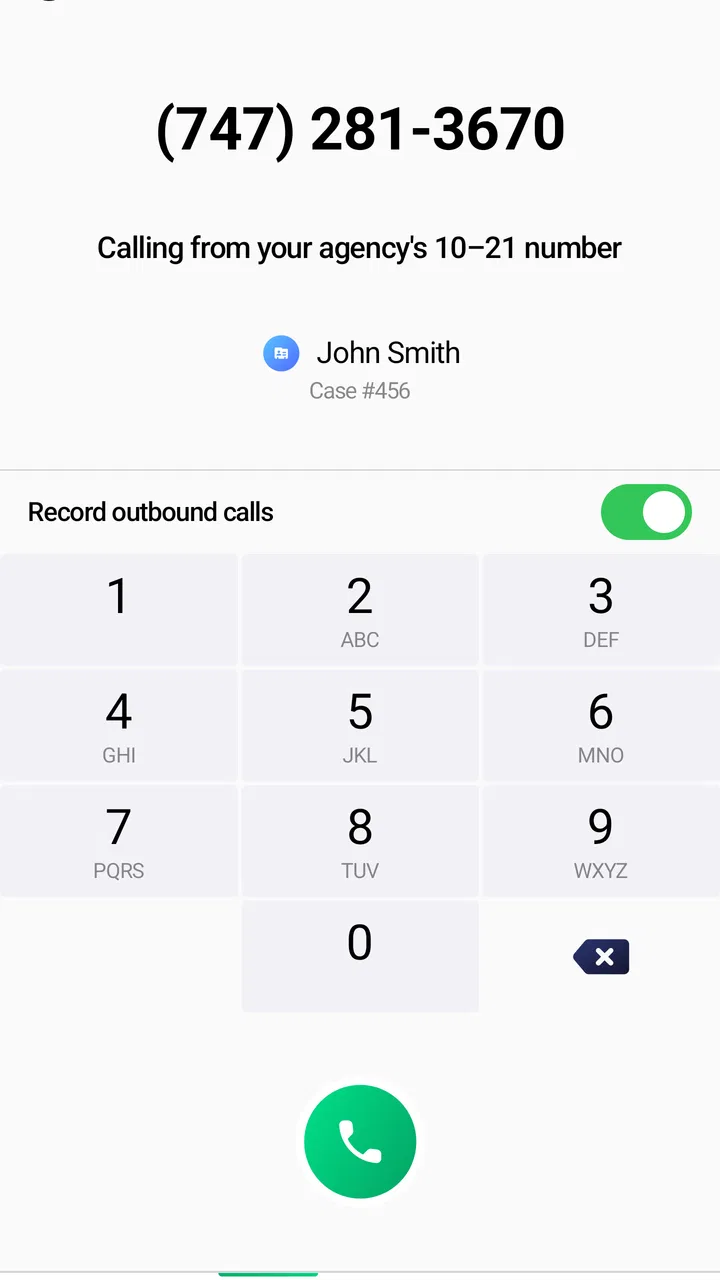
10-21 Police Phone
- 2.8
- Rating
- 100.00K
- Installs
- Free
- Price

 Analysis by App-foxy
When a phone call needs to reach the right law-enforcement contact, the usual dialer can feel surprisingly limited. 10-21 Police Phone takes a narrower approach: it is a communication app from Motorola Solutions built around calling for law enforcement, with the short description “10-21 Police Phone.” I approached it less like a general messaging tool and more like a focused utility for people who need a police-related calling workflow on a mobile device.
That distinction matters. This is not an app I would install as a replacement for everyday calls, texts, or group chats. Its value depends on whether its intended calling context matches your needs and whether you can use it reliably when your phone has a working connection. My overall impression is practical but cautious: the concept is easy to understand, while the usefulness depends heavily on the situation, your location, and how well the app fits the communication habits of the organization or users involved.
How the app feels when connectivity is part of the job
The clearest way to understand this app is to imagine a mobile moment in which you need to contact law enforcement without searching through unrelated contacts or relying on a generic phone interface. A dedicated app can reduce that mental clutter. Instead of opening a broad communication platform and deciding which route to take, you begin with a purpose-specific tool.
You May Also Like

 Blood Strike: 2.5 Anniversary
Blood Strike’s Loadouts Turn Every Drop Into a Tactical Gamble
A close look at Blood Strike’s custom loadouts: how fast access to signature weapons reshapes its battle royale rhythm, rewards preparation, and narrows the gap between fights.

 Pandora - Music & Podcasts
Pandora’s Music Is Easy to Start, but Harder to Recover
Pandora’s strength is its low-effort path from a seed to a station. Its weak spot is how much confidence it asks you to place in connection, setup, and quiet recovery.

 8 Ball Pool
 Is Built on Rivalries, Rematches, and Routine
A close look at the rivalries, rematches, shared routines, and unanswered safety questions that turn a quick pool match into a persistent mobile community.

 Samsung Music
’s Quiet Strength Is Playing What You Already Own
Its reach comes less from spectacle than from dependable access to a personal library. That simplicity is both the app’s strongest retention engine and its ceiling.

 AccuWeather: Weather Radar
AccuWeather Review: A Quick, Clear Forecast for Everyday Decisions
For everyday plans, the best forecast is the one you can understand quickly. AccuWeather makes rain timing, radar, and local conditions easy to act on, with a few trade-offs.

 Hill Climb Racing
Why Hill Climb Racing Still Turns Crashes Into One More Run
A tiny car, a bumpy hill and one more upgrade: Hill Climb Racing keeps resurfacing because its simple chaos makes every near-miss feel personal.
More From Our News Desk



That advantage is also its first limitation. A calling app cannot create a connection where the phone has no usable network access. In a parking lot with weak reception, inside a building with poor signal, or while moving between coverage areas, the experience may be less predictable than the simple interface suggests. I would treat the app as a convenient route to a call, not as a guarantee that the call will complete.
This is especially important in urgent situations. If immediate emergency help is needed, I would not spend time troubleshooting an application. I would use the fastest recognized emergency option available in my area. The app makes more sense for an intended police-contact workflow where the person already understands whom they are trying to reach and has enough connectivity to place the call.
In ordinary use, the network question is easy to overlook because calling feels like a basic phone function. Yet the app’s usefulness is tied to the same practical conditions as other connected communication tools: the device must be usable, the connection must be available, and the receiving side must be reachable. That makes preparation more valuable than it might be with a casual social app.
A focused purpose instead of a general communication toolbox
Most communication apps try to cover several channels at once. They combine chat, media sharing, contact discovery, notifications, and sometimes video. This app is more restrained in purpose. I see that as a benefit for users who want a direct calling-oriented experience, because there are fewer unrelated choices competing for attention.
The trade-off is that it does not replace the flexibility of familiar alternatives. A standard phone app is usually better for calling friends, businesses, medical offices, or family members. A messaging service is better when you need a written record or want to send a photo. An emergency service’s established contact method is better when speed and official routing matter more than having a separate interface.
So the right comparison is not “Is this better than every communication app?” It is “Does this give me a useful police-calling path in the situations I actually face?” For a person who never needs that workflow, the answer will probably be no. For a user who wants the purpose visible on the phone and prefers a dedicated tool, the narrower design may be worthwhile.
What I would do before relying on it
I would test the app during a calm moment rather than waiting for a stressful one. That means checking how quickly it opens, confirming that the calling action is understandable, and learning what happens when the phone is connected through the usual mobile network or Wi-Fi. I would avoid placing unnecessary calls simply to experiment, but I would still make sure the basic path is familiar.
I would also keep the usual phone application available. A dedicated calling utility should be an additional route, not the only route stored on the device. This is one of the most useful practical lessons from connectivity-dependent apps: redundancy is more reassuring than assuming one interface will always work.
If you use the app in a professional setting, I would go further and agree on a simple fallback procedure with colleagues. Decide which normal phone method should be used if the app will not load, if the connection drops, or if the intended contact cannot be reached. That small preparation removes guesswork at exactly the moment when guesswork is least helpful.
Using it in real mobile situations
A phone is rarely used from a perfect desk setup. You may be walking, carrying equipment, standing outside a building, or trying to make a call while your attention is divided. A purpose-built communication app needs to be judged in those conditions, not only by how tidy it looks when opened at home.
One realistic scenario would be a security worker moving between several locations during a shift. When a situation requires a police-related call, opening a clearly named tool may be easier than searching a long contact list. The benefit is not advanced automation; it is reducing the number of decisions between recognizing the need to call and starting the intended communication.
Another scenario is a property manager who occasionally needs to contact law enforcement about a non-routine incident. The app could serve as a visible reminder of the intended communication purpose, while the normal dialer remains available for tenants, contractors, and emergency alternatives. In that arrangement, the app is useful because it separates one type of call from the rest of the phone’s daily clutter.
I would be more hesitant to recommend relying on it while driving, cycling, or handling a situation that already demands physical attention. No calling app makes distracted phone use safe. The sensible workflow is to stop in a safe place, use hands-free equipment where appropriate, or have another person place the call.
Screen visibility can matter too. Bright outdoor light, gloves, rain, or a damaged display can make any touch interface frustrating. I would not assume that a dedicated app solves those physical problems. Its advantage is organization, not magic. If your work routinely involves harsh environments, the phone itself, accessibility settings, and an established hands-free procedure may matter more than the app.
Why a mobile shortcut can still be valuable
There is a subtle difference between knowing a phone number and having a reliable workflow. A number in a notebook may be correct, but finding it under pressure takes time. A general contact entry may be mixed with similarly named records. A purpose-specific app can act as a mental shortcut: it tells you why you opened it and what kind of call you are preparing to make.
That shortcut is most useful when the app is placed where you can find it quickly and when you have already learned its basic behavior. I would keep it separate from entertainment and social applications, and I would avoid burying it inside a crowded folder. This is a small organizational choice, but it can make the difference between a prepared tool and an app that is technically installed yet practically forgotten.
At the same time, I would not confuse a shortcut with official dispatch priority. The app does not change the seriousness of the call, the availability of the receiving agency, or the rules that apply to emergency communication. It simply gives the user a focused way to initiate the intended contact.
When the connection fails or the app behaves unexpectedly
Connectivity problems are not always obvious. The phone may show signal but still struggle to complete a call. A Wi-Fi connection may be present while internet access is unstable. The app may open normally, yet the next action may take longer than expected. These are ordinary realities of mobile communication, and they are why I would avoid treating the app as a single point of failure.
If the app does not open, my first response would be to stop repeating the same tap. I would check whether the phone itself can make a normal call, then use the established alternative if the situation is urgent. If the problem is not urgent, I would close and reopen the app, verify the connection, and try again later. The important point is to separate troubleshooting from emergency response.
A dropped call also deserves a clear plan. I would not assume that the interruption means the recipient has received all relevant information. If safe and appropriate, I would call back through the available method and briefly restate the essential details. For recurring professional use, keeping the fallback contact method known in advance is more valuable than relying on memory during a disruption.
There is another recovery issue that is easy to miss: the user may not know whether the first attempt succeeded. A busy screen, delayed response, or interrupted connection can create uncertainty. I would pay attention to the phone’s normal call history and confirmation behavior, while remembering that a record of an attempted call is not proof that a conversation was completed.
Keeping the app useful without wasting mobile data
Because this is a communication utility rather than a media-heavy social platform, I would not expect its everyday use to resemble streaming video or constant photo sharing. Still, connected actions consume some form of network access, and users with limited plans should develop sensible habits rather than assume every app is cost-free in practice.
The simplest approach is to use a trusted connection when it is convenient, but not to delay an important call merely to wait for Wi-Fi. Saving a few megabytes is never worth postponing necessary communication. For routine testing or learning the interface, a normal home connection may be suitable; for a time-sensitive situation, the safest available communication route should take priority.
I would also review the phone’s normal battery and background-use settings if the app is installed on a work device. That is not because I would assume unusual behavior, but because every additional communication app adds another item to manage. Keep the application updated through the device’s normal store process, and check that the phone itself has enough battery for the calls you may need to make.
The current version is 7.8.0, so users should pay attention to whether their installed copy is current before depending on it. An update can change the way an interface behaves, which is another reason to open the app occasionally and remain familiar with its call flow instead of installing it once and forgetting it.
Privacy, responsibility, and the limits of a calling tool
Police-related communication can involve sensitive information. I would avoid discussing unnecessary personal details in any call and would be careful about using a shared or unlocked phone. The app’s presence on a device does not remove the need for ordinary phone security, considerate communication, and accurate reporting.
I would also think carefully about whether a situation truly belongs in this workflow. A dispute that needs documentation may be better handled through an official non-emergency channel or another method advised by the local authority. A matter requiring immediate intervention should use the recognized emergency route. The app can support a calling process, but it cannot decide the urgency, jurisdiction, or correct response for you.
This is where the app differs from many casual communication products. With a chat app, sending a message to the wrong group is embarrassing. With a law-enforcement calling tool, choosing the wrong route or delaying the call can have much more serious consequences. I appreciate the focused purpose, but that focus also demands better judgment from the user.
Who should install it, and who should skip it?
I can see a place for this app on the phone of someone who regularly works around security, property management, public-facing facilities, or other environments where police contact may be part of a defined procedure. It may also appeal to users who prefer a dedicated calling entry point rather than keeping every important contact inside a general address book.
I would skip it if you are looking for a complete communication suite, a replacement for emergency services, or a way to communicate without a functioning connection. It is also not the right choice if your main need is written evidence, image sharing, team coordination, or broad contact management. A standard dialer, an official local service, or a workplace communication system may serve those needs better.
The app is free to install, which lowers the barrier to trying it, but in-app purchases range from around five dollars to around fifty dollars per item. That makes it sensible to review any purchase prompt carefully before confirming it. For a person who only wants a straightforward calling utility, I would want to understand exactly what an optional purchase adds before spending money, rather than assuming every paid item is necessary for basic use.
Its Everyone content rating also makes it broadly accessible from an age-classification perspective. That does not mean every user is equally prepared to use it responsibly. Younger users, shared-device users, and anyone unfamiliar with local emergency procedures should be guided by a responsible adult or organization before treating it as part of a safety plan.
What the public response suggests
The app has passed the threshold of one hundred thousand installs, but its average rating is around 2.8 from roughly six hundred ratings, with more than three hundred written reviews. I read that combination as a reason to approach it with realistic expectations rather than assuming the narrow purpose guarantees a smooth experience for everyone.
A middling rating does not automatically make the concept useless. Communication tools can be judged harshly when they fail at a critical moment, and differences in device, network, region, or expected workflow can strongly affect satisfaction. Still, the rating is a useful warning: I would test the app personally and keep a backup method instead of accepting it as dependable without practice.
Motorola Solutions is the developer, which gives the app a clear connection to a company known for communication technology. Even so, the developer name should not replace practical testing. What matters to me as a user is whether the app opens when needed, presents the intended call path clearly, and fits the local procedure I am expected to follow.
My connectivity verdict
After looking at the app through the lens of real mobile use, I see it as a specialized calling aid rather than a universal safety solution. Its strongest quality is focus: the purpose is visible, the workflow is narrower than a general communication platform, and that can reduce hesitation for the right user.
Its weakest point is equally clear. The app lives inside the realities of mobile connectivity. A weak signal, an unavailable service, a low battery, or uncertainty about the correct contact can outweigh the convenience of the interface. That does not make the app pointless; it means the app should sit inside a larger plan that includes the normal phone function and the appropriate local emergency procedure.
My recommendation is therefore conditional. If you have a genuine need for a dedicated police-calling workflow, install it, learn it in advance, and test it without waiting for a stressful event. Keep the regular dialer available, understand when an official emergency route is more appropriate, and do not delay urgent help while troubleshooting. If you simply want a general-purpose communication app, choose the standard phone tools you already trust instead.
10-21 Police Phone is most useful when it adds clarity to an existing communication plan, not when it is expected to replace one. That is a modest role, but for the people who need exactly that role, a focused mobile entry point can be more valuable than a crowded collection of unrelated communication features.
FAQs for 10-21 Police Phone
01What is 10-21 Police Phone, and what can I use it for?
10-21 Police Phone is an informational app designed to help users find police department contact details and access non-emergency law-enforcement information more conveniently. It is intended for routine questions, reports, and local assistance rather than urgent incidents. The available features and department coverage may vary depending on your location, so check the listed information before relying on it.
02Can I use 10-21 Police Phone to report an emergency?
No. 10-21 Police Phone should not replace emergency services. If someone is in immediate danger, a crime is happening, or you need urgent medical, fire, or police assistance, contact your local emergency number directly, such as 911 in the United States. The app is better suited to non-emergency communication, general contact information, and situations where an immediate response is not required.
03Does 10-21 Police Phone work in every city or country?
Coverage may depend on the police departments and locations supported by the application. Before downloading, users should confirm whether their city, county, or region is included and whether the displayed phone numbers are current. If you travel or move, the app may not automatically provide complete local coverage. Always verify important contact information through an official government or police website.
04Is 10-21 Police Phone free to download and use?
The download and available features can depend on the Android or iOS version, developer policies, and any current in-app purchase or advertising arrangements. Review the app-store listing carefully for pricing, subscriptions, advertisements, and permissions before installing it. Even when the app itself is free, normal mobile-data or telephone charges may apply when calling a department through the information provided.
05Does the app protect my privacy and personal information?
Privacy depends on the permissions requested and the way the developer handles usage data, device information, location details, or communication activity. Before installation, read the privacy policy and app-store data-safety section carefully. Avoid entering sensitive personal information unless it is clearly necessary and handled through an official secure channel. The app should be treated as a contact-information tool, not a confidential reporting platform.
Pros
- Offers a broad collection of police and emergency contact numbers.
- Simple interface makes numbers easy to find quickly.
- Useful for travelers who need local police contacts abroad.
- Covers non-emergency police services in many locations.
- Lightweight app with minimal storage and battery demands.
Cons
- Information may vary in accuracy between countries or regions.
- Some numbers can change without immediate app updates.
- Requires internet access for certain location-based information.
- Not a replacement for calling your country’s official emergency service.
- Limited usefulness in areas with incomplete police contact coverage.

10-21 Police Phone
Gallery